

The best approach for privacy-focused, no-sign-in RSVPs isn't a generic form builder. It's a hosted invite platform that sends each guest a personalized URL (PURL), verifies their identity with a one-time password before revealing private event details, and tracks every response in real time. That platform is Headsup.
Headsup sends unique invite links by SMS or email, collects RSVPs without requiring guests to create accounts, and keeps private details like your venue address hidden until a guest passes a quick OTP device check. For U.S. hosts, it also handles the compliance side: TCPA-aware sending, 10DLC registration support, and exportable consent records. CRM imports from HubSpot and Salesforce mean your existing guest data flows straight in.
- Privacy by design: venue address and private fields stay hidden until OTP verification
- No friction for guests: no app download, no account creation
- Personalized links: each guest gets their own URL, not a shared form link
- SMS + email delivery: with TCPA-compliant opt-in capture and 10DLC handling
- RSVP tracking: live dashboard, dietary fields, plus-one rules, and data export
Ready to skip the generic form? Create your first personalized invite on Headsup in minutes.
Pro Tip: Use Headsup's guest list manager to build a reusable contact list before your first send. Importing once saves you from re-entering the same names for every event.
Key Takeaways
A privacy-first RSVP platform that sends personalized links and verifies guests via OTP gives U.S. hosts cleaner guest lists, higher response rates, and a clear compliance record without requiring guests to sign in.
| Point | Details |
|---|---|
| Use PURLs, not shared links | Each guest gets a unique URL tied to their record, improving trust and response tracking. |
| Enable OTP for private details | Venue address and access codes stay hidden until the guest verifies their phone number. |
| Collect SMS opt-in separately | Under TCPA, an RSVP does not grant marketing consent; add a distinct checkbox at the RSVP step. |
| Budget SMS credits by cadence | Multiply guest count by planned message touches to estimate credit needs before sending. |
| Headsup covers the full workflow | Personalized links, OTP verification, CRM import, live RSVP tracking, and exportable consent records in one platform. |
Table of Contents
- What should you look for in a hosted RSVP platform?
- How do personalized URLs and OTP verification actually work?
- How Headsup handles personalized RSVP pages
- What does a hosted RSVP platform typically cost?
- Why privacy-first PURLs are the right default for U.S. hosts
- Headsup gets you from guest list to live invites fast
- Sources
What should you look for in a hosted RSVP platform?
The difference between a platform that works and one that causes headaches usually comes down to five things: privacy architecture, delivery reliability, guest experience, data portability, and compliance.
Core evaluation criteria
- Privacy-by-design: private details (address, dress code, access codes) should be hidden until the guest verifies their device, not just password-protected at the page level.
- PURL support: every guest should receive a unique link tied to their record, not a shared form URL.
- OTP or device verification: a lightweight check that confirms the guest is on the right device before revealing sensitive fields.
- SMS + email sending with 10DLC handling: the platform should manage A2P 10DLC registration and STOP processing so your texts actually reach inboxes.
- RSVP tracking and exports: a live dashboard plus the ability to export guest data and consent records.
- CRM integration: HubSpot and Salesforce connectors for professional planners who manage contacts at scale.
- Mobile-first invite pages: templates that load fast and look sharp on a phone screen.
- Custom RSVP questions: dietary fields, plus-one rules, private guest questions.
Questions to ask any vendor
- How do you handle 10DLC registration and carrier opt-out (STOP) processing?
- Where is guest data stored, and when exactly is a private address revealed?
- Can I export opt-in records and audit logs for compliance purposes?
- Does the platform capture a distinct SMS marketing opt-in at the RSVP step, separate from the RSVP itself?
- How are text credits billed, and what happens to undelivered messages?
Red flags to watch for
- Guests must download an app or create an account to RSVP
- No mention of 10DLC compliance or STOP handling
- Text credits are opaque or billed in confusing bundles
- No audit log or exportable consent records
- Private event details visible to anyone with the link
Pro Tip: Copy those five vendor questions into a shared doc before any sales call. Platforms that hedge on 10DLC or can't explain where address data lives are telling you something important.
How do personalized URLs and OTP verification actually work?
A PURL is a unique web address tied to one specific guest, such as yourevent.com/sarah-chen. According to Bitly's guide to personalized URLs, PURLs increase trust and enable sharper tracking by delivering a tailored landing-page experience without requiring a major engineering build. The landing page matches the message the guest received, which is why response rates tend to be higher than with a generic shared link.
Here's how the full workflow runs:
- Build your guest list. Import contacts from a CRM or upload a spreadsheet. Each record gets a unique identifier.
- Generate PURLs. The platform creates one link per guest, embedding their identifier in the URL.
- Send via SMS or email. Each message carries the guest's unique link and a branded link preview so they recognize it.
- Guest arrives at their personalized page. Their name appears, the event details load, and the RSVP form is ready.
- Optional OTP check. Before private fields (venue address, access code) are revealed, the guest enters a one-time code sent to their phone. TCSN's research on OTP verification confirms this step ties each RSVP to an active mobile number, filtering out bots and fake entries without forcing account creation.
- Host monitors responses. The RSVP dashboard updates in real time. Segmented sends and unique tracking links let you see which channel drove each response.
Compliance matters here. Under TCPA, an RSVP or ticket purchase does not automatically grant permission to send future marketing texts. Collect a separate, explicit opt-in checkbox at the RSVP step if you plan to remarket to guests later. Store that proof. Platforms that handle 10DLC registration and STOP processing protect your deliverability and keep you on the right side of carrier rules.
- Keep PURL back-halves short and recognizable (first name + last initial works well)
- Map each PURL to a CRM record ID for lifecycle follow-up after the event
- Use custom link previews so the SMS share card shows your event name and image, not a raw URL
Pro Tip: Send a small test batch of 10–20 guests before your full list. Confirm OTP delivery times, check that the link preview renders correctly on iOS and Android, then scale.
How Headsup handles personalized RSVP pages
Headsup maps directly to every criterion above. The operational flow is straightforward: create your event, pick a template, import your guest list or pull from a CRM, generate personalized links, and send. Guests RSVP from their unique page without creating an account. Enable OTP and the venue address stays hidden until they verify.
According to Blackthorn's 2026 event software trends report, CRM connections, automated lifecycle messaging, and real-time dashboards are now baseline expectations for professional planners. Headsup covers all of them.
Key features and what they do for you:
- Personalized invite pages: mobile-first templates with fast load times, calendar adds, and map links, matching Messagear's 2026 digital invitation standards
- PURL generation: one unique link per guest, auto-generated from your list
- SMS + email sends: scheduled or immediate, with branded link previews
- OTP device verification: private details revealed only after the guest passes a phone-number check
- RSVP tracking: live dashboard showing who's coming, dietary preferences, plus-one counts
- CRM import: HubSpot and Salesforce connectors for professional planners
- Guest questions: private fields for dietary needs, accessibility requests, or custom questions
- Plus-one rules: set caps, require approval, or allow open plus-ones
- Potluck sign-ups and polls: built into the same invite page
- Data export and audit logs: full consent records and RSVP data exportable at any time
Pro Tip: Enable OTP for any event where you're sharing a physical address or access code. It takes 30 seconds to turn on and eliminates the awkward "I accidentally forwarded the invite" problem.
What does a hosted RSVP platform typically cost?
Most platforms, including Headsup, use a freemium model. The free tier covers a limited number of guests per event and basic features. Paid plans unlock higher invite limits, scheduled sends, premium templates, and business tools like CRM sync and team access.
What usually costs extra:
- SMS text credits: typically sold as packs or on a pay-as-you-go basis. Budget by multiplying your guest count by your planned message cadence (initial invite + one reminder = two credits per guest, minimum).
- Scheduled sends: often a paid feature, though operationally worth it for reminders.
- AI design tools: available on higher tiers.
- CRM connectors and single sign-on: usually business-tier features.
- Additional report exports or live support: varies by platform.
Platforms that handle 10DLC filings and carrier relations pass SMS costs through as credits. Ask specifically how undelivered messages are handled and whether you're charged for bounced texts. A platform that manages STOP processing and re-registration transparently is worth paying more for.
Pro Tip: For events with multiple SMS touches, budget your text credits by multiplying guest count by message cadence. Run a small paid test send first to validate delivery rates before committing to the full list.
Why privacy-first PURLs are the right default for U.S. hosts
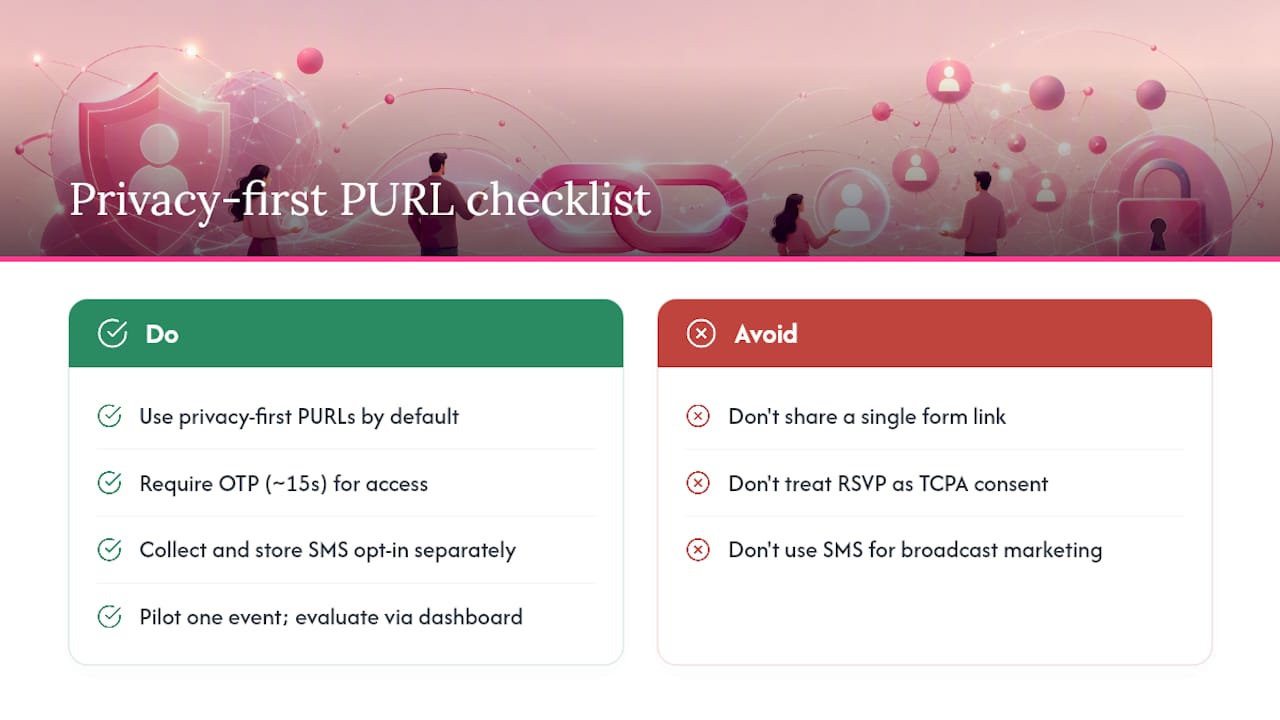
Most hosts underestimate how much a shared form link costs them in trust. When every guest gets the same URL, there's no way to know who opened it, who forwarded it, or whether the person RSVPing is actually the person you invited. A PURL closes that gap. It's a small technical lift that yields a noticeably cleaner guest list and a better experience for guests who feel seen rather than mass-blasted.
The OTP step gets dismissed as friction, but the friction is minimal and one-sided: it takes a guest about 15 seconds and it saves the host from a venue address circulating on group chats. For corporate events, exclusive dinners, or anything with a physical location, that tradeoff is obvious.
The SMS compliance piece is the one area where hosts consistently cut corners and regret it. An RSVP confirmation does not equal marketing consent under TCPA. Collect that opt-in separately, store the record, and use SMS for what it does best: time-sensitive operational updates, not broadcast marketing.
Pilot one event with Headsup before committing to a full rollout. The workflow is fast enough that you'll have a live invite page within an hour, and the RSVP dashboard will tell you everything you need to know about whether the approach fits your events.
Headsup gets you from guest list to live invites fast
If you've been patching together a shared form link, a spreadsheet, and a group text thread, Headsup replaces all three. Each guest gets a personalized invite page sent by SMS or email, RSVPs without creating an account, and sees private details only after a quick OTP check. You watch responses come in on a live dashboard and export everything when the event is done.
The free plan covers small events and lets you test the full workflow before spending anything. Paid plans add scheduled sends, higher guest limits, AI design, and CRM connectors for HubSpot and Salesforce. SMS credits are available as one-off packs if you don't need a full subscription. Explore all Headsup features to see which tier fits your next event, or start building your invite now and have a live personalized RSVP page ready today.
Sources
- SMS Marketing for Events: Playbook and Compliance | TickPick
- Personalized URLs | Bitly Blog
- Can OTP SMS Service Protect Online Event Registrations? | TCSN
- Event Management Software Trends 2026 | Blackthorn
- Digital Invitation Trends 2026 | Messagear