

Send a text message invitation by writing one short message that names the event, date, time, and a single reply instruction, then send it to your guest list. Every invite needs three things: who's hosting and what the event is, when and where it happens, and exactly how guests should RSVP. For hosts who want built-in tracking, privacy, and reusable guest lists, Headsup handles all of it without requiring guests to download anything.
Your invite must include:
- Event identity: Host name, event type, and occasion (e.g., "Sarah's 40th birthday dinner")
- Logistics: Date, time, and location (or a link to reveal the address securely)
- One clear action: "Reply YES or NO" or "Tap the link to RSVP"
Key Takeaways
Text message invitations work best when the message is short, the RSVP action is single and clear, and follow-ups are automated to confirmed and pending guests separately.
| Point | Details |
|---|---|
| Three invite essentials | Every text invite needs event identity, logistics, and one clear RSVP action. |
| Match RSVP method to event size | Keywords for small groups, unique links for medium, forms for large guests. |
| Schedule three touchpoints | Send the invite, a one-week reminder, and a day-before logistics text. |
| Privacy via OTP | Use invite pages with device verification to share addresses safely. |
| Headsup for full workflow | Free to host, pay per text; covers RSVP tracking, imports, OTP privacy, and AI design. |
Table of Contents
- How do text message invitations work for hosts and guests?
- What templates and personalization options work best?
- How does RSVP tracking and guest management work?
- How do you import contacts and schedule your sends?
- What do text invitations cost?
- What about deliverability, privacy, and legal compliance?
- Sample texts, timing, and best practices hosts can copy
- Why text invitations are worth the small learning curve
- Headsup makes text invitations simple from the first send
- Sources
How do text message invitations work for hosts and guests?
The host flow is straightforward. You create an invite, either a short SMS with event details or a full invite page, then choose how to send it: one-to-one from your personal number, bulk SMS through a provider, or a shareable link. You also set the RSVP method upfront, whether that's a keyword reply, a one-tap link, or a short form.
Host flow:
- Create your invite or invite page
- Upload or import your guest list
- Choose send method (personal SMS, bulk, or link)
- Set RSVP method (keyword, link, or form)
- Schedule sends and reminders
Guest flow:
- Receive the SMS or MMS
- Open the invite or tap the link
- Reply with a keyword or tap to RSVP
- Receive an instant confirmation
- Get reminder texts as the event approaches
Single-keyword SMS replies like YES, NO, or MAYBE make RSVP automation reliable and cut manual follow-ups dramatically. When a guest texts YES, the system logs them as confirmed, fires a confirmation reply, and adds them to your attending segment automatically.
The real advantage of text RSVPs: Guests reply in seconds because the action is frictionless. No login, no app, no form to hunt for. The reply lives in their message thread, which means they actually do it.
Pro Tip: Set up your keyword automation before you send. Test it yourself first by texting YES to your own number and confirming the confirmation reply fires correctly.
SMS reaches recipients faster and more consistently than email, which matters when you're coordinating time-sensitive events. Most texts are read within minutes of delivery.
What templates and personalization options work best?
The right format depends on the occasion and how much detail guests need before they can RSVP.
| Occasion | Best format | Why |
|---|---|---|
| Birthday party | Short SMS + invite page link | Casual tone, address revealed via OTP |
| Wedding save-the-date | MMS with image + link | Visual impact, early notice |
| Baby/bridal shower | Invite page link | Collects meal choices, plus-ones |
| Corporate event | Plain SMS + RSVP link | Professional, no image clutter |
| Dinner party | Short SMS, keyword reply | Small list, fast turnaround |
Personalization options that actually move the needle:
- Guest name tokens: "Hi [First Name]" in the opening line lifts reply rates
- Unique RSVP links: Each guest gets their own link, so replies are pre-attributed
- Meal choice fields: Collect preferences at RSVP time, not in a follow-up text
- Plus-one rules: Set approval requirements so headcount stays accurate
When your event has a private address, sensitive details, or a dress code you don't want forwarded, an invite page beats a plain MMS. Private details stay hidden until the guest verifies their device via OTP, which means the address doesn't end up in a group chat.
Pro Tip: Use Headsup's AI invitation design to generate a themed invite in seconds. Describe the event and the tool builds the visual, so you skip the design step entirely.
How does RSVP tracking and guest management work?
Three RSVP methods cover most events, and each fits a different scale.

RSVP method comparison:
| Method | Best for | Pros | Cons |
|---|---|---|---|
| Single-keyword SMS | Small events (under 30) | Instant, zero friction | Limited data collection |
| Unique one-tap link | Medium events (30+) | Tracks per guest, collects extras | Requires internet |
| Short RSVP form | Large events (100+) | Structured, exports cleanly | Slightly more steps |
For medium-to-large events, sharing an RSVP link or form rather than asking for free-text replies keeps your data clean and automatically captures headcount and meal choices without a follow-up text.
What to collect and when:
- At initial RSVP: Name, yes/no/maybe, headcount
- In a follow-up (confirmed guests only): Meal choice, dietary restrictions, plus-one name
- Via guest questions: Anything private (gift preferences, accessibility needs)
Headsup's RSVP tracking organizes responses into live segments: attending, declined, and pending. You can export the list, sync to a calendar, or push updates to all confirmed guests with one send.
Pro Tip: Confirm receipt immediately with an auto-reply ("Got it! You're on the list."), then ask for meal choices only after the initial YES. Stacking questions in the first message kills reply rates.
How do you import contacts and schedule your sends?
Your guest list quality determines your deliverability. Before you send anything, verify numbers are in E.164 format (+1XXXXXXXXXX for U.S. numbers) and remove duplicates.
Contact sources and hygiene steps:
- Manual entry: Fine for under 20 guests; error-prone at scale
- CSV import: Upload a spreadsheet with name, number, and any custom fields
- CRM sync: Headsup supports HubSpot and Salesforce imports for business events
Sending options by scenario:
- One-to-one SMS: Best for intimate events; personal feel, your number shows
- Bulk A2P texting: Required for 50+ recipients; uses a registered sending path
- Invite link sharing: Drop a single URL in any channel (MMS, email, social) for open events
Scheduling multiple touchpoints increases attendance. A reliable cadence: initial invite, a reminder one week before, and a logistics text the day before. Schedule all three when you set up the event so you don't have to remember.
Pro Tip: Before any bulk send, test your invite on 3–5 internal numbers across iOS and Android. Check that the link preview renders, the OTP flow works, and the confirmation reply fires. Fix issues before they hit 200 guests.
What do text invitations cost?
Pricing follows one of three models depending on the platform and volume.
Common pricing structures:
- Freemium + pay-per-text: Free to create and host; pay only when you send SMS or buy text packs (Headsup's model)
- Monthly subscription: Flat fee covering a set number of messages per month
- Pay-as-you-go text packs: Buy credits in bulk; unused credits roll over
Cost factors to budget for:
- Number of recipients
- SMS (plain text) vs. MMS (image/media, typically 3–4× the cost)
- Carrier pass-through fees
- A2P 10DLC registration for high-volume sends (one-time or annual fee)
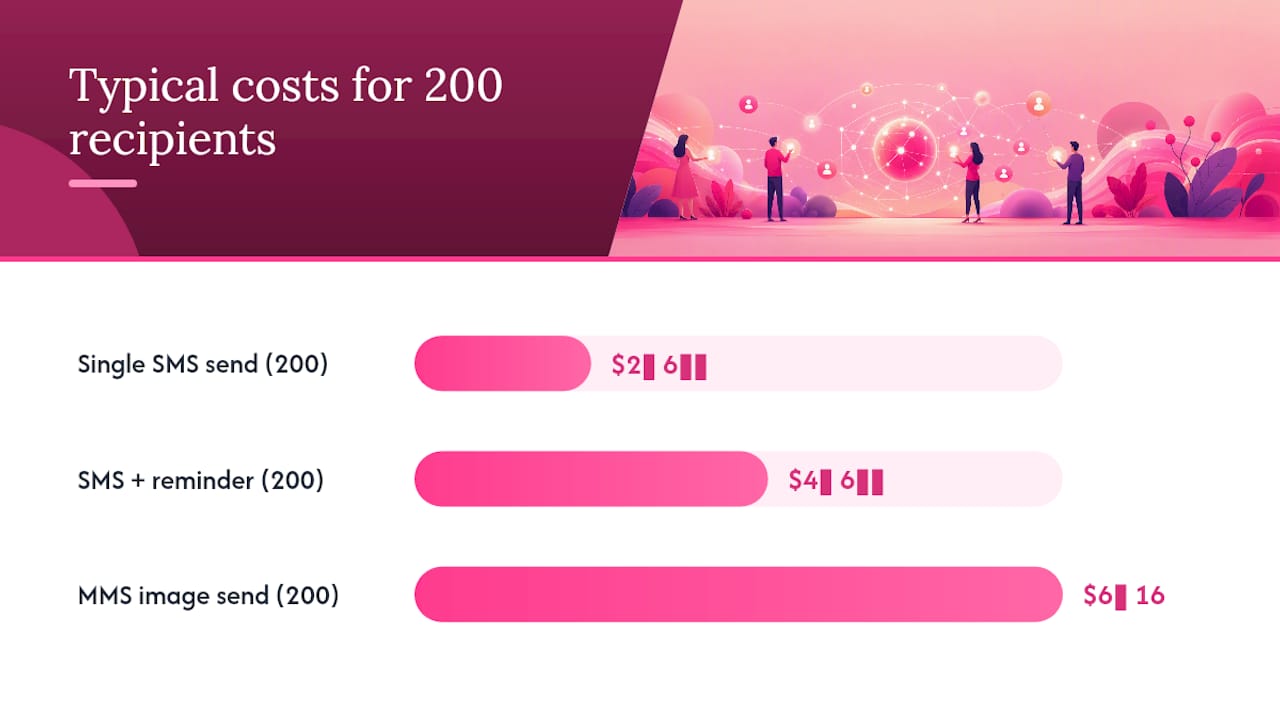
Quick estimate: 200 recipients at a typical SMS rate of $0.01–$0.02 per message puts your send cost at $2–$4 for a plain-text invite. Add a reminder and you're at $4–$8 total. Sending an invite page link instead of an MMS image keeps you in SMS territory and cuts media costs.
- Estimate your recipient count
- Decide SMS vs. MMS (link vs. image)
- Check whether A2P registration applies to your volume
- Compare per-text vs. pack pricing at your expected send frequency
Pro Tip: Sending an invite page link via SMS is almost always cheaper than MMS and gives guests more detail. Use MMS only when the visual is genuinely part of the experience (e.g., a wedding save-the-date).
See Headsup's pricing for current text pack rates and free-tier limits.
What about deliverability, privacy, and legal compliance?
Deliverability starts with number format. Invalid or landline numbers bounce immediately. Beyond that, the path your message travels matters.
Deliverability basics:
- Use E.164 format for all U.S. numbers
- Avoid spam-trigger language ("FREE," "WIN," excessive caps or exclamation marks)
- For 50+ recipients, register your sending application via A2P 10DLC to reduce carrier filtering
Privacy and consent in the U.S.:
- Obtain express consent before sending mass texts; a prior relationship (friend, colleague) generally covers personal event invites, but document it for business events
- Include a clear opt-out instruction ("Reply STOP to opt out") in every bulk send
- Honor opt-outs immediately; do not re-add opted-out numbers
On TCPA and event texting: The Telephone Consumer Protection Act applies to automated or bulk SMS. Personal event invites sent one-to-one from your own phone sit in a different category than marketing blasts, but bulk sends through an A2P platform require consent documentation and opt-out compliance. When in doubt, treat your guest list like a marketing list.
For private event details, OTP-protected invite pages reveal the address only after the guest verifies their device. That keeps your home address out of forwarded texts.
Pro Tip: Keep your event RSVP texts completely separate from any promotional or marketing messages. Mixing them creates TCPA exposure and confuses guests about why they're receiving texts.
Sample texts, timing, and best practices hosts can copy
Send timeline:
- 4 weeks out: Initial invite (all guests)
- 1 week out: Reminder to non-responders only
- 1 day out: Logistics text to confirmed guests (parking, entry, what to bring)
- Day of: Optional "See you tonight!" to attending guests
SMS writing formula: [Host name] + [event] + [date/time/location or link] + [one action] + [RSVP deadline]
Sample texts by occasion:
Birthday party: "Hey! It's Jake's 40th — Saturday, August 9 at 7 PM. Tap to RSVP and get the address: [link]. Please reply by August 2."
Dinner party (keyword RSVP): "Hi [Name], you're invited to dinner at our place — Friday, July 18 at 6:30 PM. Reply YES or NO and we'll send details."
Wedding save-the-date: "Save the date! Emma & Luis, October 4. Formal invite coming soon. [link]"
Corporate event: "You're invited to the Q3 team offsite — Thursday, September 11, 9 AM–5 PM. RSVP here: [link]. Deadline: September 1."
Including your name, a direct yes/no/maybe, and guest count is the clearest format guests can use when replying by text. For physical invitations that list a keyword, guests text that keyword to start an automated reply flow that collects name and headcount.
SMS do's and don'ts:
- Keep plain SMS under 160 characters to avoid message splitting
- Use one emoji maximum; none for corporate events
- Never include the full address in the SMS body
- Always name yourself in the first line so guests recognize the sender
- Test on both iOS and Android before bulk send
Pro Tip: For non-responders, send the reminder only to the pending segment, not the full list. Confirmed guests don't need a nudge, and re-texting them reads as disorganized.
Why text invitations are worth the small learning curve
The friction of tracking RSVPs manually, chasing people on multiple platforms, and updating a spreadsheet at midnight before an event is a real cost. Text invitations cut that loop short. Guests reply in the same thread where they saw the invite, and a well-set-up system routes those replies into a live guest list without any manual sorting.
The privacy angle is underrated. Hosts who share their home address in a group chat or a forwarded email have no control over where it ends up. An OTP-verified invite page solves that without adding friction for guests who've already confirmed.
One honest caveat: text invitations work best when guests actually want to hear from you. For professional or semi-formal events, confirm that texting is the preferred channel before you send. Some guests, particularly older relatives or senior colleagues, may prefer a phone call or a paper card. The technology is only as good as the communication preference it respects.
Headsup makes text invitations simple from the first send
Headsup gives hosts a complete text invitation workflow without stitching together separate tools. Create a personalized invite page, send unique links to each guest via SMS, and let the platform handle RSVP tracking, dietary preferences, plus-one approvals, and event updates in one place. Private details stay hidden behind OTP verification until guests confirm their device, so your address never ends up somewhere it shouldn't.
The pricing model is built for occasional hosts: free to create and host, pay only when you send texts or buy a pack. No monthly commitment required. Headsup also supports CSV and CRM imports, scheduled sends, and AI-generated invite designs, so scaling from a 10-person dinner to a 200-person corporate event uses the same workflow. Start a free event, import your guest list, and send a test invite to yourself before you commit to anything.
Sources
Resources used in this guide:
- How to Send Text Message Invitations: Step-by-step | SimpleTexting
- How to RSVP via Text as a Guest or Host